Geocoding
geopandas supports geocoding (i.e., converting place names to
location on Earth) through geopy, an optional dependency of geopandas.
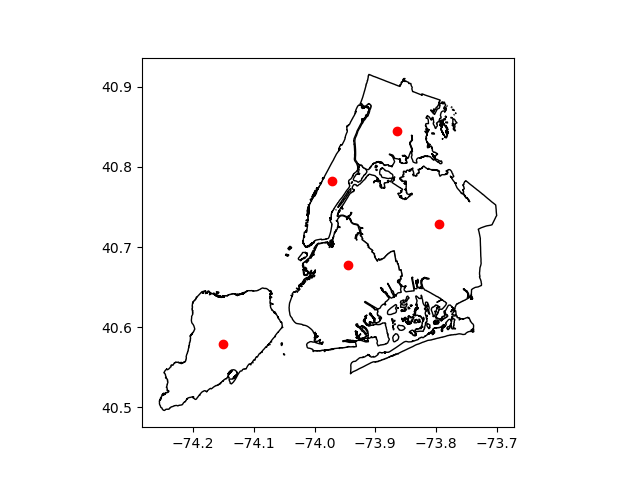
The following example shows how to get the
locations of boroughs in New York City, and plots those locations along
with the detailed borough boundary file included within geopandas.
In [1]: boros = geopandas.read_file(geopandas.datasets.get_path("nybb"))

In [2]: boros.BoroName
Out[2]:
0    Staten Island
1           Queens
2         Brooklyn
3        Manhattan
4            Bronx
Name: BoroName, dtype: object

In [3]: boro_locations = geopandas.tools.geocode(boros.BoroName)

In [4]: boro_locations
Out[4]:
                             geometry                       address
0  POINT (-74.150201215 40.579536649)        Staten Island, NY, USA
1  POINT (-73.794851209 40.728226673)               Queens, NY, USA
2  POINT (-73.944151212 40.678176665)             Brooklyn, NY, USA
3  POINT (-73.971241212 40.783066682)  Manhattan, New York, NY, USA
4  POINT (-73.864821210 40.844786692)                Bronx, NY, USA

In [5]: import matplotlib.pyplot as plt

In [6]: fig, ax = plt.subplots()

In [7]: boros.to_crs("EPSG:4326").plot(ax=ax, color="white", edgecolor="black");

In [8]: boro_locations.plot(ax=ax, color="red");
By default, the geocode function uses the
GeoCode.Farm geocoding API with a rate limitation
applied. But a different geocoding service can be specified with the
provider keyword.
The argument to provider can either be a string referencing geocoding
services, such as 'google', 'bing', 'yahoo', and
'openmapquest', or an instance of a Geocoder from geopy. See
geopy.geocoders.SERVICE_TO_GEOCODER for the full list.
For many providers, parameters such as API keys need to be passed as
**kwargs in the geocode call.
For example, to use the OpenStreetMap Nominatim geocoder, you need to specify a user agent:
geopandas.tools.geocode(boros.BoroName, provider='nominatim', user_agent="my-application")
Attention
Please consult the Terms of Service for the chosen provider. The example
above uses 'geocodefarm' (the default), for which free users are
limited to 250 calls per day and 4 requests per second
(geocodefarm ToS).